SDE Project Checkpoint 1: Team Contract, Standards & Planning
Deliverables
Team Process & Planning – 70 points – due Friday, September 25th, 11:59pm
- Prerequisite: Team Setup
- Teamwork Contract (20 pts)
- Standards & Guidelines Document (20 pts)
- Feature Backlog & Project Planning (25 pts)
- AI Tooling Setup (5 pts)
- Extra Credit (7 pts)
What is different this semester
In previous semesters every team worked on the same small application, and this checkpoint was purely about your team's own process. This year you are joining an established open-source project that already has conventions, a contribution workflow, and opinions about how code should be written.
That changes the job. You are not inventing standards from nothing — you are reading the ones the project already has, deciding which to adopt, and documenting where your team will go further. Most professional software work looks like this.
Team Setup
Your Project and Repository
Your team and project were assigned from the preferences you submitted, and your team's repository is distributed through UCF Code Classroom — the same app you joined for Assignment 1, so there is no new link to accept. Sign in, open the project, and your team's repository is there. Every member of the team has write access, so you can all push branches, open pull requests, and manage issues directly.
You should have already cloned this repository and gotten it running as part of
Assignment 2, starting from the STUDENTS.md
file in the repository root. If any member of your team still cannot run the project,
fix that first — it blocks everything below.
Communication Channel
Choose a messaging app to use for your team (e.g., Slack, Discord, etc.)!! Make sure all the members have access to the communication tool!
Wiring GitHub notifications into your team chat — ask and we will set it up
Piping commits, pull requests, and issue activity into a channel is well worth the ten minutes it takes, and teams that do it review each other's pull requests noticeably faster. Both routes need permissions above what your team has on the repository, so post on Ed Discussions and the course staff will action it — this is expected, not an imposition, and several teams have already done it.
- Slack: install the GitHub app in your workspace and request access to the
UCF-CEN-5016organization from it. Send the request and post on Ed Discussions; an instructor will approve it, after which you can/github subscribeyour team repository from the channel yourself. - Discord: create a channel webhook in Discord (Channel Settings → Integrations →
Webhooks) and post its URL on Ed Discussions along with the repository name. We will
add it to the repository with content type
application/jsonand the events you want.
Post the webhook URL in the Ed Discussions thread for your team rather than anywhere public — anyone holding it can post into your channel.
Project Board
Code Classroom links a project board to your team repository when it creates it, the same way it did for your Assignment 1 repository. Open it from the "Projects" tab and switch it to the Board view. If your team does not have one, create it yourself following the steps from Assignment 1.
Create backlog issues in the repository, then add them to the board
As in Assignment 1: create each issue from your repository's Issues tab and add it to the board through the "Projects" field in the sidebar, rather than typing it directly into a board column. Items created on the board are draft issues — they do not live in your repository, so they cannot be linked from a pull request, cannot carry labels or milestones, and do not show up in the repository history we grade from.
The exception is the User Stories column, where draft issues are what we want. See Feature Backlog & Project Planning below.
You should use your team repository for all your development, and be sure to use good development practices, including keeping your commits cohesive and your commit messages informative.
We will be grading you on how well you follow the process we used for Assignment 1 and utilize this Project board:
- Create issues for feature improvements or bug-fixes
- When creating an issue, assign team members and tag with appropriate labels
- Create a pull request and reference the issue it will be resolving
- Provide feedback to pull requests
- Use a Kanban board to track your workflow
We will use your commit history and issue/pull request activity on GitHub to assess both your teamwork process and each member's individual contributions towards the project. It is not acceptable for one person to commit all the work after synchronizing through other means.
CI jobs that fail for reasons unrelated to your work
Each repository runs the real project's own pipeline, and a few of those jobs cannot
succeed in a course repository — they need infrastructure the upstream maintainers
provide, or permissions the repository does not grant (Resource not accessible by
integration is the usual symptom, and a failing gating job will leave everything
downstream marked "skipped").
Your team may leave such a job alone, fix it, or delete it from .github/workflows/.
Whichever you choose, decide it as a team and record it in standards.md under the
pull request process, so your Definition of Done reflects what actually has to be green
before you merge. We are grading whether your team has a coherent, followed standard —
not whether you reproduced an open-source project's entire CI environment.
For each code-based deliverable, we will look at a snapshot of your repository at the deadline.
Main Deliverables
Teamwork Contract (20 pts)
When working with a team, it is important to discuss each team member's background, and establish common expectations of the team. Miscommunication or the general lack of communication are often the most common causes of team conflict.
Team Conflict Example
A common conflict in working style is when there are team members who always want to get a headstart on their work, while there are team members who are fine with doing work a few days before the deadline. It causes panic in the former team members, while the latter team members feel frustrated as to why they are being rushed.
As such, your first process task of the semester will be creating a teamwork contract with your teammates. It is a 1 - 2 page document containing information that all teammates agree to follow. You should work on the contract with all members present. We recommend that you keep it to around 1 page, 2 pages is a hard limit.
Additionally, it is more important that you only include statements that the team will adhere to than it is to fulfill the length requirement (quality over quantity!) You do not need to write full sentences (bullet points are okay), but your decisions must be clearly conveyed in the document.
You are free to include anything that your team deems necessary, but you should minimally address the following sections:
-
Expectations
How much time is each team member expected to be putting into working on projects? Punctuality? How would your team accommodate when unexpected commitments come up for a team member (e.g. interviews, sickness, competitions)?
Do accommodate for the fact that project load can get heavier towards the middle of the semester. -
Communication
What platform(s) will your team be using to communicate? What's the expected time to get a response?
For any communication platforms you decide on, please test that everyone can receive notifications. We highly recommend using apps (Slack, Discord) over browser-based sites. -
Meeting Schedule
When and how will your team meet? What modality would it be?
A strong recommendation would be to set up a recurring 1hr meeting blocked out for the rest of the semester, so that your team does not have to scramble to find a common meeting time each week. Teams that have recurring meetings are generally more successful in the class. -
Responsibilities
How will you divide responsibilities for each project? During meetings, who will be in charge of note taking, organizing & running those meetings?
From past courses, we noticed the natural emergence of a project manager in teams, who ensures the project moves towards completion. We highly suggest that you consider how your team would rotate that role amongst team members over the course of the remaining projects. Throughout the semester, we will ask for documentation of your meeting notes, so be sure to keep them organized (we recommend using a shared Drive folder). -
Equitable Contribution & Conflict Resolution
What are the steps the team would take to address teammates who are contributing too little, and when will the team bring this up to the instructors? What are the steps to bring up and discuss potential teamwork issues?
The first thing the staff will ask the student when they mention that they are facing team issues is if they have followed the steps on their team contract.
Feel free to seek the assistance of the instructor in drafting this document.
Note
We may ask you to reference, reflect upon, and refine this document throughout this semester, and we will evaluate your team's process strategies and interactions through what you outline in this contract. Please ensure that everyone on your team thoroughly discusses each of the above sections and agrees with the final decisions.
Once you have completed the contract itself, have all members sign and date the document as an indicator that all members have read the document and agreed to uphold all outlined items. Then, save the file as a PDF and upload it to Webcourses. Only one team member needs to make the submission, as this will be a group submission on Webcourses.
We also highly recommend that you make the teamwork contract easily accessible in your team's chosen communication platform (e.g., bookmarking it in Slack).
Standards & Guidelines Document (20 pts)
Your teamwork contract covers how your team works. This document covers how your code works — and unlike the contract, you are not starting from a blank page.
Your project already has conventions. Your job is to find them, decide what to adopt, and write down where your team goes further.
Step 1: Map what already exists
Before writing anything, read the project's own guidance. Note that STUDENTS.md is ours,
not the project's — it will get you running, but it is not a source of the project's
conventions. What you want here is what the project itself says:
CONTRIBUTING.md— almost always the primary sourceAGENTS.mdorCLAUDE.md— instructions the project gives to AI coding tools- Linter and formatter configuration (
.eslintrc,.rubocop.yml,.golangci.yml,.prettierrc) - CI workflow files in
.github/workflows/— these tell you what the project actually enforces, which is sometimes stricter and sometimes looser than what the docs claim - Any existing definition of done, PR template, or issue template
Read the CI, not just the docs
Documentation drifts; CI does not. If CONTRIBUTING.md and the CI workflow disagree
about what must pass before a merge, the workflow is the truth.
What to do when the project has almost no stated conventions
Some of these projects document every convention; others have a thin CONTRIBUTING.md,
inconsistent commenting, and expect you to infer the rest from the code around you. If
you are in the second group, that is a finding, not a dead end — write it down as
what you discovered in Step 1.
Then supplement. Borrow or adapt guidelines from another open-source project in the same
language that does have good practices, agree on them as a team, and cite where you
took them from in standards.md. "We adopted the Go Code Review Comments guidelines
because the project itself is silent on comment style" is a strong answer. Leaving a
section blank because the project did not tell you what to write is not.
Step 2: Adopt, adapt, supplement
Write a living document at docs/cen5016/standards.md in your team repository,
covering each of the sections below. For each one, say explicitly whether your team is
adopting the project's existing convention, adapting it, or supplementing it
where the project is silent — and why.
- Coding conventions — style guide, linting and formatting, framework-specific conventions your project follows.
- Branching and commit conventions — branch naming, commit message format. Many of these projects use Conventional Commits; check before you invent your own.
- Pull request process — PR description format, how many reviewers are required, what must be true before a merge.
- Testing expectations — which kinds of change require tests, where tests live, naming conventions, and your team's minimum expectation.
- AI tool use — which tools your team uses, how usage is logged, who is responsible for reviewing AI-written code, and how a PR containing significant AI-generated work is flagged. See AI Tooling Setup below.
- Definition of Done — adopt the project's if it has one, and supplement where it does not. At minimum, a change is done when: it has been reviewed, tests pass, CI is green, and documentation is updated.
This is a living document. You will be asked to revisit it at Checkpoint 2, and part of that grade is whether you actually used it.
This is not a document you write by asking an agent to write it
A standards document that was generated rather than decided is obvious to read and useless to follow, because nobody on the team agreed to anything. Have the conversation, then write down what you agreed.
Feature Backlog & Project Planning (25 pts)
Before your team jumps into development, you must first determine what to build. Schedule and hold an initial project planning meeting with your team to complete the steps below.
Walkthrough: from a user story to merged work
This step-by-step walkthrough (shown in lecture) follows one feature through the whole process: writing user stories as drafts, ranking them, converting the chosen story into a real issue, filling in every required field, breaking it into sub-issues, linking dependencies, and moving the work across the board. Click inside it, then use → or Space to step forward and ← to go back. Press F for full screen.
Functional Requirements - User Stories
During this meeting, discuss potential functional requirements for your project. Consider what use cases the system serves and what features it is missing or does poorly.
Then document these functional requirements as user stories following the guidelines discussed in lecture, in the format "As a [role], I want [function], so that [value]".
You should come up with at least two user stories per student in your group.
Formulating User Stories
You now have a real advantage that previous semesters did not: your project has a real issue tracker, full of real users asking for real things. Read the upstream project's open issues and discussions. What do people actually complain about? What has been requested repeatedly and never built?
Grounding your user stories in what real users have asked for is far stronger than inventing needs from scratch — and noting where an idea came from is part of the issue format below.
As a team, come up with a prioritization ranking for each user story, based on two factors:
- Impact: how essential is this user story to the overall functionality of the application for your stakeholders, and how much would it benefit them
- Effort: how much time/effort is required to implement this user story
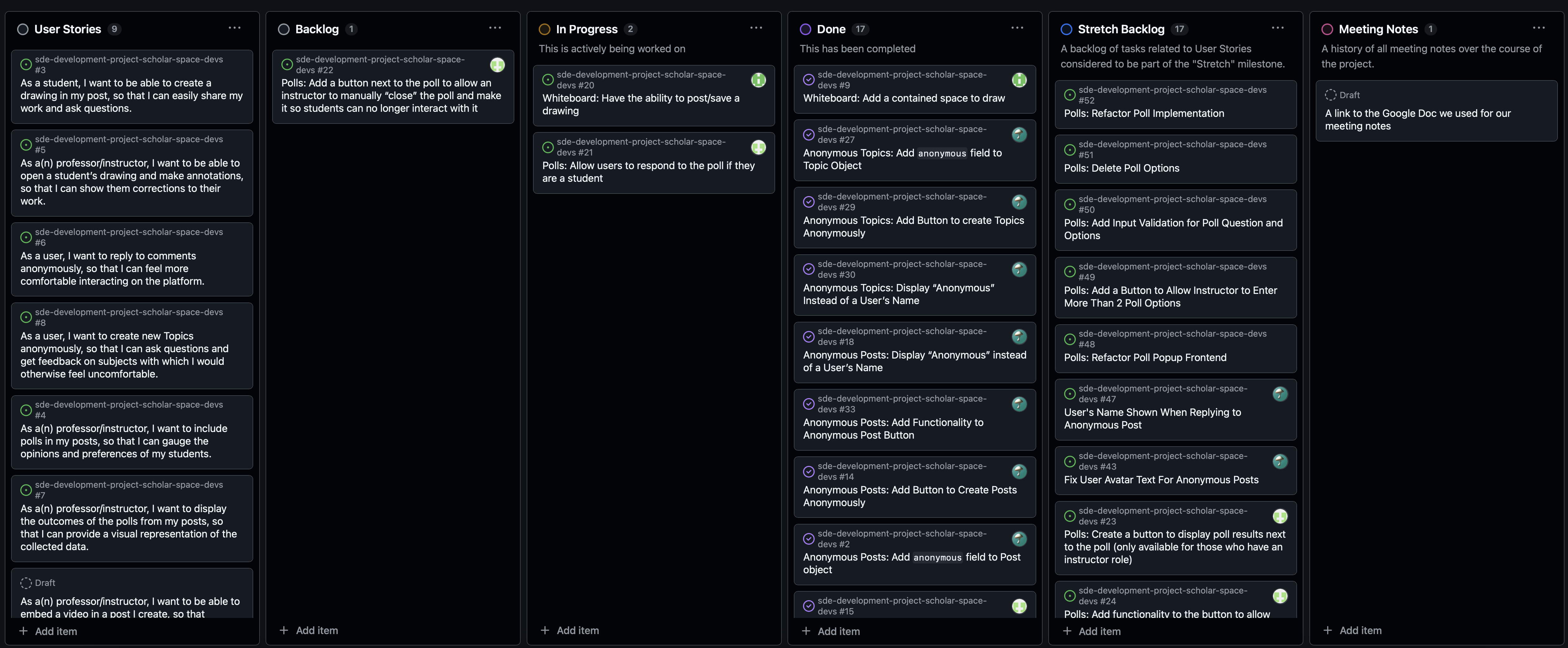
Create a GitHub Project board for your team repository. Add two columns to the left called "User Stories" and "Backlog", so that you have "User Stories", "Backlog", "To-Do", "In Progress" and "Done", in that order from left to right. Feel free to add more columns if your team decides you need them.
Add your user stories into the "User Stories" column as draft issues. In the body of each, provide a brief but concrete justification of the prioritization ranking your team decided on. Order the column from highest to lowest priority.
Make it visible who wrote which user story
The two-per-student requirement is something we have to be able to check, so each draft issue needs to say who authored it. Assigning each draft issue to the team member who wrote it is enough — nothing else is required. (Naming the author in the body works too, if your board is set up in a way that makes assignment awkward.)
Your project manager can add them all to the board on the team's behalf; it is the assignee that matters, not who did the typing.
Technical Requirements - Backlog Issues
Now consider the technical requirements of your prioritized user stories, and decide which one(s) you will focus on over the next development sprint. Your team is aiming to maximize the value delivered given your constraints.
Convert the feature(s) you decide to implement into GitHub issues in your team repository, and add them to the "Backlog" column. Each backlog issue must contain:
| Field | What it means |
|---|---|
| Title | Short, descriptive, action-oriented |
| Summary | What the feature is, why it matters, who benefits |
| User story | "As a [role], I want [action] so that [outcome]" |
| Rough scope | Small / Medium / Large / XL, with a one-sentence justification |
| Source | Where the idea came from — an upstream issue, a discussion thread, a teammate, your own use of the app |
| Estimated effort | Your team's estimate |
| Dependencies | Other issues this one depends on, if any |
| Assignee | Who is taking it |
| Milestone | Which sprint it is targeted at |
| Acceptance criteria | How you will know it is done — think about how you will test it |
Each issue must also carry two labels, which you should create in your repository if they do not already exist:
- Scope:
scope: small,scope: medium,scope: large, orscope: xl - Type:
type: feature,type: improvement, ortype: bug
Selecting Appropriate User Stories
Given the amount of variation in each team's user stories, it is hard to give a concrete guideline on how many a team needs to tackle. Teams could tackle 1 user story that requires major effort, or a few that each require less.
In general, we expect user stories to be selected given:
- 2 sprints of roughly 2 weeks each
- the number of team members on your team
- an assumption of 8 hours/week available per individual
Be realistic about the fact that these codebases are large. A change that would take an afternoon in a small application can take considerably longer here, because most of the work is finding the right place to make it. The course staff is happy to discuss this with your team during office hours and we highly recommend you do so if your team is unsure.
The feature(s) you plan to implement should not be purely cosmetic or arbitrary.
Note
An example of what would not be accepted is a cosmetic feature that only modifies a frontend UI component (i.e. changing the color of the navbar), or just the renaming of a field in the database.
A Note on Grading
We will not assess how accurately you predicted your development process, nor will we give points based on the complexity or quality of your changes. The focus of our evaluations will be on how you decompose the problem, how you respond to unexpected circumstances, and how you analyze and reflect on your experience later on.
We will check your development progress at the end of each sprint. Please be proactive in your planning to ensure that you make notable progress.
Include a link to your GitHub board in your Webcourses submission.
AI Tooling Setup (5 pts)
This course expects you to use agentic AI tooling on the development project, and to be able to say exactly what it did. That second part requires setting up logging before you start, because you cannot reconstruct a session after the fact.
Every team member must:
- Read your project's AI guidance, if it has any —
AGENTS.md,CLAUDE.md, or an AI section inCONTRIBUTING.md. Some of these projects have explicit policies on AI-generated contributions, and your standards document must reflect them. - Have at least one agentic tool working. The Free Coding Agents section of the resources page covers the options that are free for students, how to claim them, and which to pick. You should not be paying for anything.
- Set up log capture so your sessions are recorded. SpecStory works for the agentic CLIs and has a VS Code extension for Cursor and Copilot; browser exporters work for web chat tools.
- Commit your logs to
ai-logs/checkpoint-1/<your-github-username>/in your team repository, and keep doing so from day one rather than reconstructing at the deadline.
Your standards document records which tools your team chose and how you log them; the logs themselves are the evidence.
Use your own account
Do not share credentials or API keys with your teammates, and do not commit them to the repository. Every one of the tools on the resources page has a free tier you can claim individually.
Extra Credit (7 pts)
Getting to know your colleagues in a friendly context can often lead to more effective collaboration; for example, healthy teams often get lunch together. To incentivize this, we will give your team extra credit for this assignment if you meet for a team bonding experience outside of a working session.
You might want to eat together, go out for boba, or hold a board game session. If someone on your team is not feeling well, you may also do a virtual activity such as an online gaming session (Drawphone, Skribbl.io, etc.) or social "Zoom lunch".
To receive extra credit, share the photo or screenshot of your team activity with your assignment submission. We encourage you to do these types of meetings often throughout the semester!
Grading
Re-grading
Note that you will have the opportunity to earn points back if you correct issues we point out with the project planning portion of the project when you turn in the second part of the project. However, we will not re-grade the team contract.
To receive full credit for the teamwork contract, we expect:
- All sections listed above are addressed in a roughly 1-2 page PDF document submitted to Webcourses
- Document demonstrates a clear process outline that was discussed between and agreed upon by the teammates
- All group members' signatures at the end of the document
To receive full credit for the standards & guidelines document, we expect:
-
docs/cen5016/standards.mdcommitted to your team repository - All six sections addressed
- Each section states whether the team is adopting, adapting, or supplementing the project's existing convention, with justification
- Evidence that you actually read the project's own guidance, rather than writing generic standards that could apply to any codebase
- A coherent Definition of Done
To receive full credit for the feature backlog & project planning, we expect:
- A GitHub project board linked to your team repository with:
- A User Stories column containing at least two user stories per group member that satisfy the guidelines outlined above and in lecture
- A Backlog column containing GitHub issues describing the feature(s) the team will tackle
- Every backlog issue contains all of the required fields listed above
- Every backlog issue carries both a
scope:and atype:label
To receive full credit for AI tooling setup, we expect:
- Every team member has a working agentic tool and has recorded at least one session
- Logs committed under
ai-logs/checkpoint-1/<github-username>/ - The team's tool choices and logging process documented in
standards.md